Updates

  1. Person pages list letters, writing, profiles and links as sortable tables with filters, and show each person's companies as links; Fund letters show each letter's description in its own column.
  2. Experts show a checked job title and a short description of each person; 30 more people have photographs.
  3. Every company, fund, university and publication the experts work for has a page listing the people there.
  4. Fund letters show each letter's thesis and filter by it; 225 person pages list the essays, columns and newsletter issues the person wrote.
  5. Person pages list every essay and newsletter issue a person wrote, and their own books as a table in List view.
  6. Recommends shows the five largest kinds of book and the rest under More; browse pictures load sooner.
  7. Podcasts and talks link the original episode, filter by Audio and video or Press, and list each publisher once.
  8. Pages are wider, Recommends has List and Grid, and a filter clicked again turns off.
  9. Book cards sit in a ruled grid with Open Library and Goodreads links and each book's one-line note.
  10. Funds is now Investors; each investor's styles are buttons that filter the table.
  11. Podcasts and talks on a person's page filter by year and publisher and show as a list or a grid of pictures.
  12. Quotes show only people's own words: 472 summaries written by list sites are gone.
  13. Country pages open from Browse again, and every link on the shelf lands on a page.
  14. Subject and person pages show their sections as tabs, and each book appears once on a person's page.
  15. Book cards show the quote, who said it and the source; grids show five cards to a row.
  16. On a phone, a menu holds the sections, search, Updates, Feedback and dark mode.
  17. Feedback takes a screenshot of the page with no browser prompt, opens a screenshot full size when you click it, and clears itself once sent.
  18. Book cards are centred, search names the topic each book sits in, and any text cut short shows whole on hover.
  19. Search groups its results by kind: people, companies, geographies, subjects, topics, books, funds, fund letters and papers.
  20. The Books table lists who recommended each book by name, and the browser tab names the section you are in.
  21. Feedback can take a screenshot of the page, or one you paste or choose, and opens in the corner beside Updates.
  22. Each rail button reopens its section where you left it, and Browse, Table and People show on every book and subject page.
  23. Filters grey out choices that hold nothing instead of hiding them, and Books › People filters by authors or recommenders.
  24. Feedback takes a subject line and up to three screenshots.
  25. Biographies are grouped by the person they are about: 41 new pages, from Abraham Lincoln to Lee Kuan Yew.
  26. Sport splits into 23 sports, and Religion into one topic per faith.
  27. Book lists show as cards: the cover, one recommendation quote and every recommender by name.
  28. Seventeen subjects that had two or three pages under different names now have one page each.
  29. Every page lists its Experts as authors and recommenders, with a link to them on the Experts tab.
  30. Economics, Financial history, Financial panics and Accounting are subjects of their own, with one page per financial crisis.
  31. Book, person and subject pages open inside the app, so the tabs stay in view.
  32. 996 more book covers, and photographs or logos for 227 more people and companies.
  33. Books › Browse shows every subject as cards, and the rail holds Fund letters, Papers, Experts, Books and Funds.
  34. Every topic over 150 books splits into narrower topics, each with a page of its own.

Send feedback

What is it?
Screenshots, up to 3 (optional)
or paste one with Ctrl+V

We use your email only to reply to you.

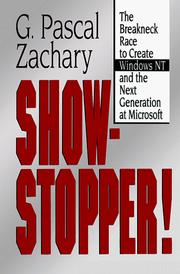
Show-Stopper!

Show-Stopper!

G. Pascal Zachary
1994
T2 325 pages · about 5h 25m to read Open Librarygoodreads

The building of Windows NT; a classic of software-project reporting.

Summary

Pascal Zachary, then a Wall Street Journal reporter, was given access to the Windows NT development team at Microsoft and produced this account of the project from 1988 to its release in 1993. It is one of the few detailed narratives of a large software project written from inside.

The project's origin was Microsoft's need for an operating system it owned outright, without the OS/2 relationship with IBM and without the DOS lineage. Bill Gates recruited Dave Cutler from Digital Equipment Corporation, where he had led the VMS operating system, along with several of his colleagues. Zachary follows the team as it grew from a handful of people to several hundred, and documents Cutler's management: his contempt for people he considered incompetent, his insistence on technical decisions, the personal cost to the team, and the repeated schedule slips.

The engineering content covers the architectural decisions, including portability across processor architectures, the microkernel-influenced design, the addition of a Windows compatibility layer after the OS/2 personality was deprioritised, and the performance and memory problems that resulted from the design choices. Zachary also covers the daily build and test discipline that Microsoft developed on this project, which became standard industry practice. The book is journalism from inside a single project rather than an analysis of software development. Its account of what a five-year, several-hundred-person project actually costs the people doing it is unusually honest.

Key takeaways 7

  1. Microsoft recruited Cutler and his team from Digital in order to acquire an operating system capability it could own outright.
  2. Portability across processor architectures was designed in from the start, which cost performance and preserved the product's future.
  3. The daily build and test discipline developed on this project became standard practice across the software industry.
  4. Adding a Windows compatibility layer late changed the product's identity and its resource requirements substantially.
  5. Zachary documents that the project's schedule estimates were wrong by years and that nobody involved expected otherwise.
  6. Cutler's technical authority held the architecture together and made the team dependent on one person's judgement.
  7. Large software projects impose personal costs on their teams that the industry treats as the price of participation.

Who should read it

Engineering leaders and founders who want a documented account of a large multi-year software project, including its schedule failures and human costs.

Similar books 6

Chosen by shared topics, the entries that hold them, and the people who recommended both.

Jennifer Edstrom, Marlin Eller · 1998

Insider account by a former Windows developer; hostile in tone.

David Bank · 2001

Microsoft's internal fights over the internet and over the antitrust case.
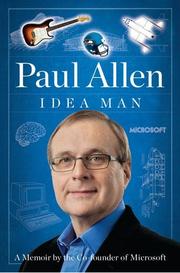
Paul Allen · 2011

A Microsoft co-founder's memoir of his ventures, successes and failures.

Recommended by: Mohnish Pabrai

James Wallace · 1997

Sequel to Hard Drive, on the browser wars and the road to antitrust.
John Ousterhout

Software's enemy is complexity, which grows through shallow modules and shortcuts.
Marc Benioff, Carlye Adler · 2009

How Salesforce was built, set out as 111 plays on marketing, sales and growth.

Where it sits in the reference 2

Companies
Industries

Topics

Technology and ComputingCompany HistoriesTech company stories